

A website can load perfectly in your browser and still present a challenge, error, or empty page to a crawler. If you want to investigate why a page is absent from ChatGPT search, start by checking the actual access path rather than immediately rewriting the article.
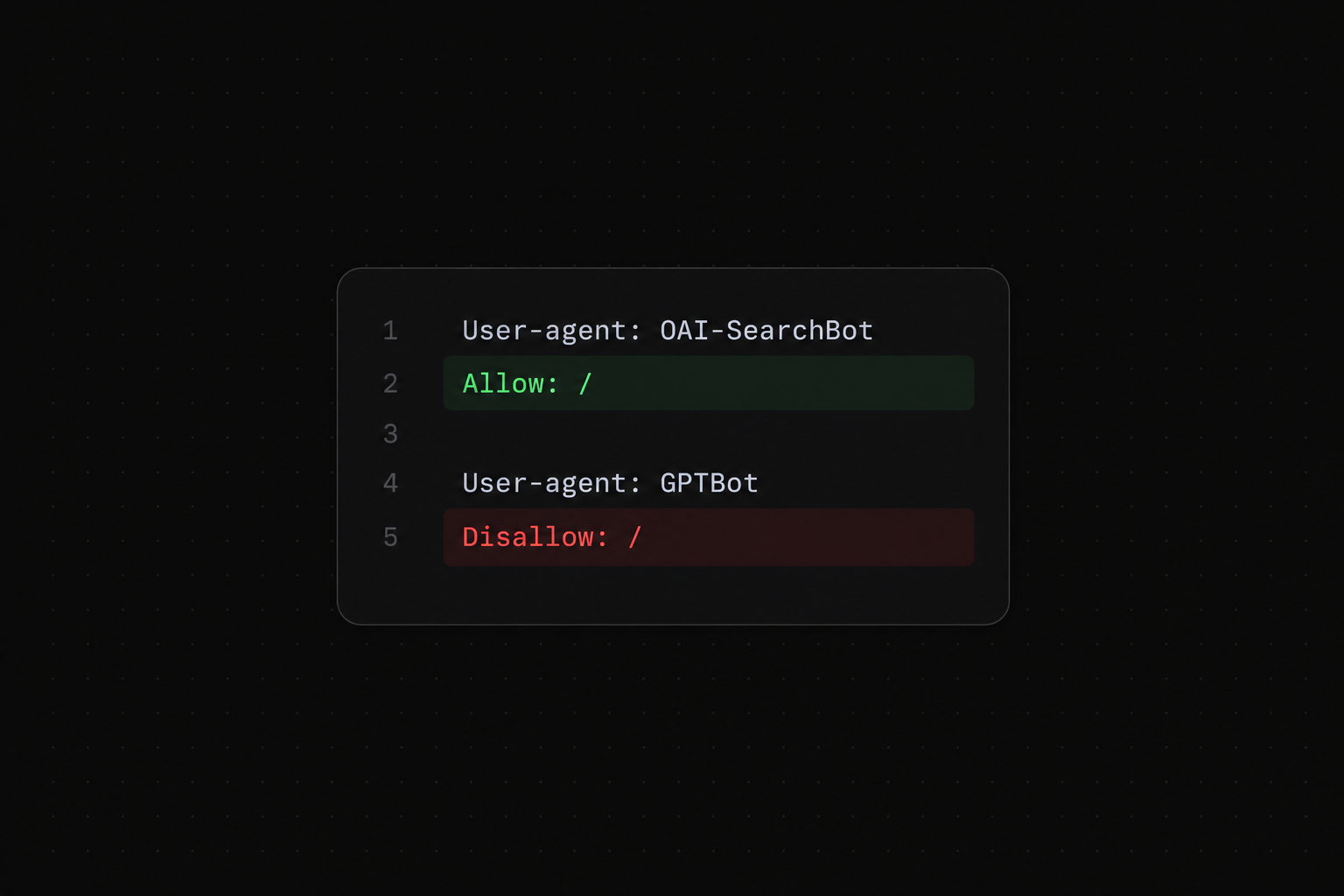
OAI-SearchBot supports search discovery. GPTBot relates to model training. Their permissions are independent. ChatGPT-User handles some user initiated visits and is not the automatic search discovery crawler. OpenAI explains these distinctions in its crawler documentation.
The practical task is to establish what happens when a relevant public page is requested: which rules apply, what the server returns, whether an intermediary blocks the request, and whether the resulting content is usable. That evidence gives your technical team a specific problem to fix.
This guide walks through a careful review for website owners and marketing teams. It uses illustrative commands and configurations, not a claim that a particular change will make your site appear in an AI answer.
Decide which access policy you actually want
Write down the public content you want people to discover and the boundaries that must remain in place. Marketing pages, documentation, and published resources may have a different policy from customer accounts, internal files, checkout pages, or unpublished drafts.
A business might choose to make public guides available for search while limiting other uses. That is a policy decision, not a reason to make every path on the website open. Keep the intended behavior explicit before editing anything.
Assign ownership. A marketer can identify the affected URL and explain why it matters. The hosting or development team should review the relevant configuration. If your site uses a managed CMS, the file you see may be generated by the platform or a plugin rather than maintained directly.
Create a short record with the URL, desired behavior, current observation, proposed change, and reviewer. This prevents a vague instruction to allow AI bots from becoming an unnecessarily broad infrastructure change.
Inspect the correct robots.txt file
Open robots.txt on the exact host serving the page. If your article lives on a separate documentation subdomain, inspect that host too. Do not assume the main website's configuration describes every other hostname.
Save the current text before making a change. Look for the crawler's named group and the fallback group using an asterisk. Review the whole file so duplicate groups or platform generated rules do not escape attention.
The Robots Exclusion Protocol defines how matching groups and path rules are interpreted. A crawler with a matching group follows those rules; the wildcard group is the fallback when a matching named group is absent. More specific path matches matter. RFC 9309.
Google also documents its own interpretation of robots.txt. Use a provider's documentation when investigating that provider rather than assuming all implementation details are identical. Google crawling documentation.
If you cannot identify which tool generates the file, pause the edit and locate the setting. A direct change that is overwritten by the next deployment gives you a temporary result and an unreliable diagnosis.
Read a configuration without opening unnecessary paths
The following is an illustrative pattern for a fictional site whose public resources should be available to search while account and draft paths remain excluded:
User-agent: OAI-SearchBot
Allow: /
Disallow: /account/
Disallow: /drafts/

User-agent: GPTBot
Disallow: /

User-agent: *
Disallow: /account/
Disallow: /drafts/
Adapt the paths to your actual website and review the effective rules with your technical owner. A named group should contain the relevant exclusions; do not rely on exclusions in another group to supply a policy you have not checked.
Also examine pattern breadth. Excluding an entire resources directory would conflict with an intention to make published guides discoverable. Excluding a narrowly defined draft path may fit that intention. Check representative URLs from both categories.
Robots.txt expresses crawler instructions; it is not an authentication system. Private information should remain protected by proper access controls. RFC 9309.
After a reviewed update, retrieve the live file again. Confirm that the deployed version is the intended one and that caches or CMS generation have not preserved an older configuration.
Request the page and inspect the response
Use an actual GET request when checking the page body. A headers only request can be convenient, but it does not show whether the returned document contains the article.
A developer can start with a command like this, replacing the fictional address with a public page they control:
curl -sS -L -D response-headers.txt -o response-body.html 'https://www.example.com/resources/public-guide'
The headers file helps reveal redirects and response details; the body file lets you inspect the content returned at the end. Record the final URL, status, content type, and whether the expected heading and article text appear.
Read the body as well as the status. A successful status can accompany a generic error message or a security challenge. A login page can also load successfully while providing none of the information you wanted to test.
Repeat the check for a homepage, product page, resource, and relevant documentation page when those page types use different templates. One working URL does not settle the behavior of another template or subdomain.
Use a bot user agent as a diagnostic clue
You can compare responses using the current user agent example published by the provider. Copy it from the official page at the time of the test rather than hardcoding a version into a permanent checklist.
A local request with that string can reveal a rule that changes behavior according to the User-Agent header. For example, the default request may receive article HTML while the altered request receives a challenge.
That comparison does not prove what the real crawler receives. Your request still comes from your own network and can have different headers, request history, and security classification. Treat it as a way to narrow the investigation.
Label the result accurately in your ticket: a simulated user agent request returned a different response. Do not label it verified OpenAI crawler access. For verification, correlate observed requests with the provider's published network information and your own trusted logs.
Avoid repeatedly requesting pages at high frequency. A small diagnostic sample is usually enough to identify a response difference for the technical team to investigate.
Review redirects and preferred URLs
Check the full path to the final page. A redirect to a renamed public guide may be intentional. A redirect to a login screen, region selector, or irrelevant homepage can prevent a visitor from reaching the information they expected.
Record whether the final URL changes across request types. If a browser reaches the article but a diagnostic request reaches a different destination, compare the conditions and inspect the rule responsible.
Also check the preferred URL shown in the page's canonical declaration. A copied template can accidentally identify another article as the preferred version. Investigate that separately from crawler permission rather than combining every problem under robots.txt.
If the page recently moved, test internal links, the old address, the new address, and the sitemap entry. Align the public navigation around the intended destination. A correct file permission will not repair an unrelated URL migration mistake.
Keep the changes focused. Fixing a broken redirect should not require changing your policy for unrelated paths or replacing an otherwise useful article.
Check whether the body contains the important information
A diagnostic request may return an application shell that depends on further browser activity to populate the content. Inspect whether the meaningful text appears in the initial response and what a normal browser ultimately displays.
Different services have different rendering capabilities. Google's JavaScript documentation describes its crawling and rendering process; that does not establish identical behavior for ChatGPT or every other assistant. Google JavaScript SEO guidance.
For a public explanatory page, ask your developer whether the essential answer can be delivered in dependable HTML. That is a practical implementation review, especially when current tests reveal missing content. It is not a claim that one rendering architecture guarantees citations.
Check more than the first heading. Make sure the steps, product facts, comparison details, and relevant links are present. A page title with an otherwise empty response does not provide the material the reader needs.
Where content is gated, decide whether a useful public explanation belongs outside the gate. Keep private product data private. A public guide can describe the method without exposing account information or unpublished work.
Inspect CDN and firewall events
If your website uses a CDN or web application firewall, the request can be handled before it reaches the application. Ask the infrastructure owner to inspect the event for the affected path and time.
Useful fields include the requested host, path, timestamp, observed source address, user agent, action, rule identifier, and response. A challenge, block, or rate limit can point to a different issue from an application error.
Check both layers when possible. The origin application can report no request because the edge blocked it. Conversely, an edge log can show that a request was forwarded while the application returned an error.
Use a narrow fix supported by evidence. Review the relevant public path and a verified crawler classification or published address range where appropriate. Retain authentication and unrelated protective rules. A blanket security bypass makes the diagnosis less precise and creates unnecessary exposure.
Retest the affected URL and confirm that the original event no longer occurs under the intended conditions. Keep a rollback record so a reviewer can restore the previous configuration if the change has an unintended effect.
Verify observed crawler requests carefully
Search your trusted edge or server logs for the relevant bot identifier. Then check the observed network address against the current published ranges linked from OpenAI's documentation. A name in the request header alone is insufficient evidence of the caller's identity. OpenAI crawler documentation.
Take care with proxy headers. The source address recorded by your application may belong to your CDN. Use the provider's trusted client address handling rather than accepting an arbitrary forwarded header as proof.
Save a small, redacted sample for the review. Retain enough information to establish the time, public URL, classification, and response while excluding account details, cookies, and sensitive query parameters.
A verified successful request supports a limited conclusion: that request reached the intended public content at that time. It does not establish that every page has been processed or that a later answer will cite it.
If you have no verified requests, mark that field unknown. Do not turn missing logs into a claim that the crawler never visited; your retention window or logging coverage may be incomplete.
Separate access results from visibility results
Your access review should have its own completion criteria. Examples include the intended robots policy being live, a broken redirect being corrected, or a verified request receiving the correct page body.
Visibility needs a separate baseline. Choose relevant buyer questions and review responses under consistent conditions. Record mentions, citations, and factual accuracy without changing the test every time you update a page.
Keep a dated change log. Record what changed, who reviewed it, and what you observed afterwards. If several unrelated updates happen together, your team will have less evidence about which one addressed the original issue.
Do not rewrite a useful page just because a technical fix does not produce an immediate citation. Revisit the question, page relevance, and source evidence. Access is one stage in the investigation, while the content's usefulness is another.
A practical handoff template for your developer
Give the technical owner enough context to reproduce the problem. Include the public URL, expected content, time of observation, current robots rules, request method, final URL, response details, and any relevant edge event.
Explain the business need in one sentence. For example, the integration guide should be available to prospective customers evaluating the product. That sentence helps the team distinguish a public discovery problem from an intentionally restricted account page.
List the smallest proposed change and the test that would confirm it. A good ticket asks to correct an identified rule for the guide and verify the returned body. It does not ask to remove all bot protections from the website.
Attach a before and after record when the work is complete. Marketing can then continue the visibility review with confidence that the technical change actually happened.
Continue the work with SERPY
The SERPY platform helps connect this technical investigation to the buyer questions and content opportunities that matter. Use AI Visibility to review tracked responses and cited pages after your infrastructure team checks access.
When the page is reachable but the answer still lacks useful information about your business, investigate coverage through Opportunity Discovery. Use Content Engine to improve the relevant article while preserving accurate product facts.
A clear public guide can help a qualified prospect decide whether to sign up. Pair it with an appropriate product explanation and onboarding link rather than treating bot access itself as a conversion strategy. Try SERPY for free to connect your visibility review with the next content improvement.
Frequently asked questions
What is the difference between OAI-SearchBot and GPTBot?
OAI-SearchBot is for search discovery; GPTBot concerns model training. Decide the policy for each separately. The distinction matters when your goal is public discovery and your organization has its own requirements for other uses of its content. Consult the current official documentation before updating the configuration.
Can I allow search while declining training?
Yes. The settings are independent. Write the intended policy clearly and have the website owner review the deployed rules. Keep that decision separate from whether the page's content answers a buyer question.
What does ChatGPT-User tell me?
It relates to certain user initiated visits. Its appearance in a log does not prove automatic search discovery. Use the request as evidence of that particular event rather than treating it as a substitute for the checks relevant to your search objective.
Is robots.txt enough to protect private information?
No. It is a set of crawler instructions, not a security boundary. Use authentication and appropriate access controls for private content. Avoid placing sensitive paths or data in a public guide merely to make a crawler test simpler.
Should I allow every path on my website?
Only implement the policy your site actually needs. Public articles and product explanations can have a different intended treatment from accounts and drafts. Review specific paths, retain private access controls, and test representative examples after a change.
Does a successful browser visit prove crawler access?
No. Your browser can have cookies, a different network address, and a completed security challenge. A crawler request can encounter another response. Compare the relevant evidence from request tests, page bodies, and trusted logs rather than relying on appearance alone.
Is a simulated user agent request a real bot test?
It tests how your system reacts to a chosen header under your request conditions. It does not authenticate you as the provider's crawler. Use it to identify response differences, and use trusted network evidence when classifying an actual observed request.
Why should I inspect the page body?
The body shows what information was delivered. A response can look successful while displaying a login screen, challenge, generic error, or incomplete shell. Check for the specific article text and links that the public page is supposed to provide.
How do I investigate a CDN block?
Find the event matching the public path and observation time. Review its action and rule identifier with the infrastructure owner. Confirm whether the request reached the application, make a narrowly justified change if needed, and repeat the relevant test.
What if I cannot find crawler logs?
First check logging coverage and retention. Ask whether events live at the CDN, hosting layer, or application. Record unknown where the evidence is unavailable. Absence from a partial log is not enough to conclude that the crawler never requested the page.
Will fixing access make my page appear in ChatGPT?
A fix establishes the intended technical behavior. Measure subsequent answers separately and check whether your page provides relevant, accurate information. A reachable page may still not be selected for a particular response.
Can SERPY fix my firewall settings?
Have your hosting or infrastructure owner handle those settings. Use SERPY for the related prompt, citation, opportunity, and content workflow described on its product pages. Try SERPY for free when you are ready to turn the investigation into a focused visibility and content plan.